
Dynamic DNS service is used to keep a domain name pointing to the same computer or server connected to the Internet despite the fact that the address (IP address) of the computer keeps changing. This service is useful to anyone who wants to operate a server (web server, mail server, FTP server, IRC server, etc) connected to the Internet with a dynamic IP or for someone who wants to connect to an office computer or server from a remote location with software such as pcAnywhere.
There are multiple ways to access your Dynamic DNS records. For this tutorial, we’ll be doing this through our Modular Editor. To set up your Dynamic DNS, please do the following:
1. Log into your easyDNS account and select your domain by clicking on MANAGE.
2. Go to DNS SETTINGS.
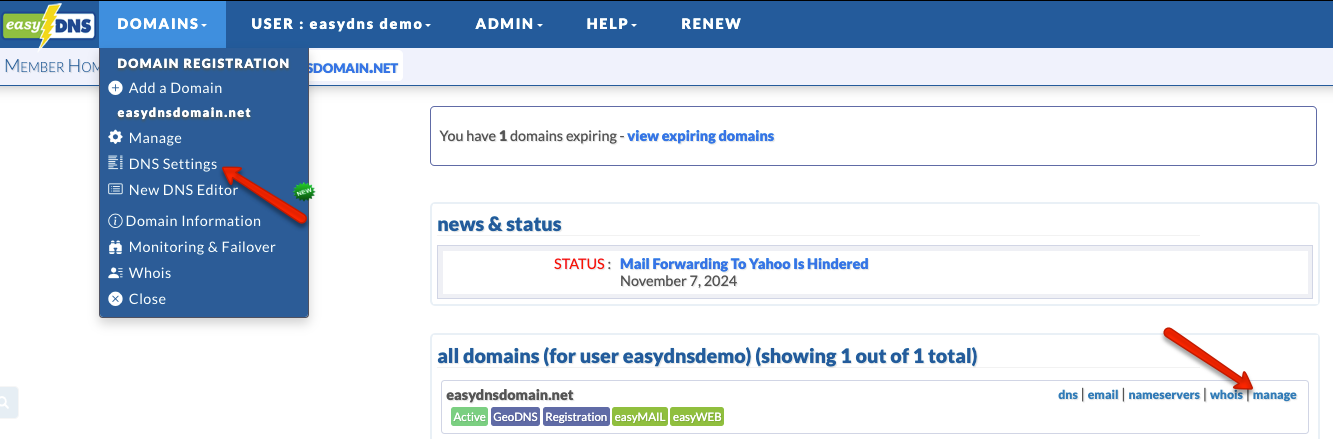
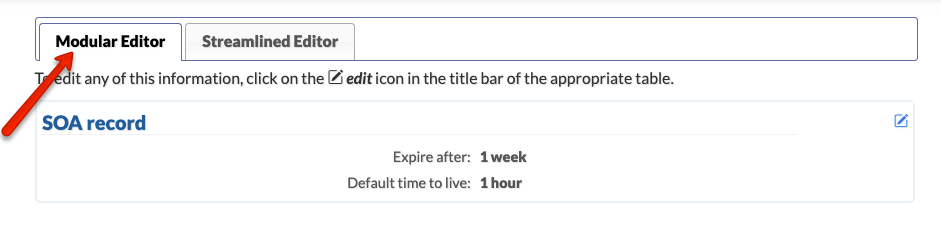
3. Click on the MODULAR EDITOR tab. Click on the EDIT icon for DYNAMIC RECORDS.
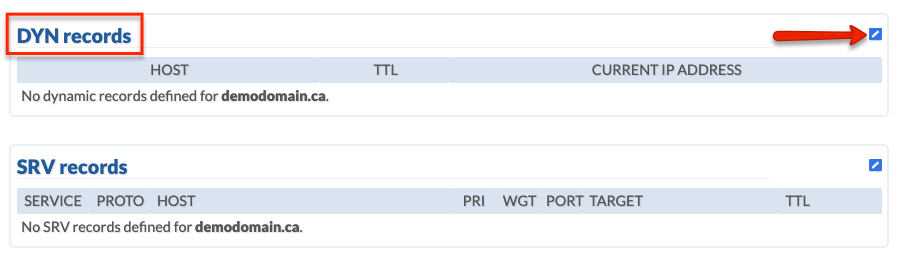
4. Create your dynamic records by defining your hostname(s) and a TTL.
5. Create a Dynamic Authenticated Token by clicking on ENABLE.
6. Click on NEXT.
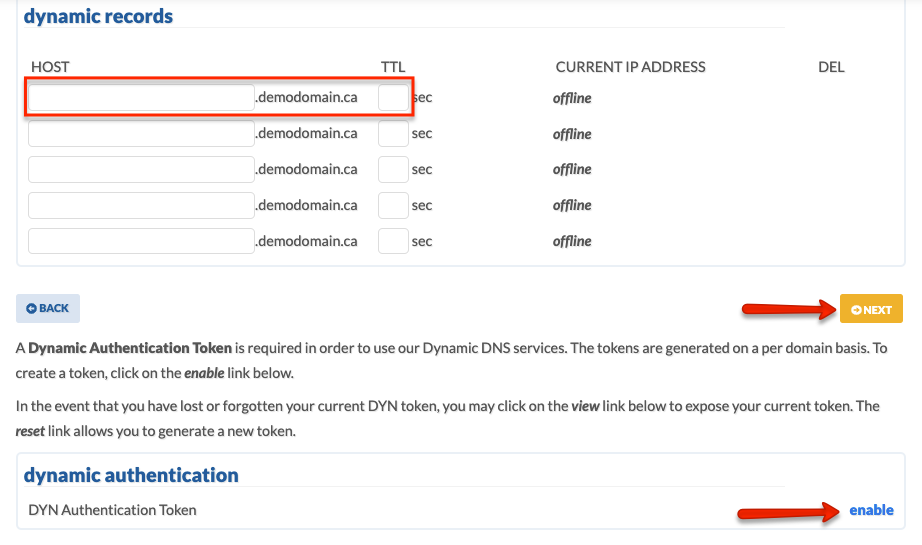
7. Confirm the changes
Setting Up Your System To Use Dynamic DNS
There are several different ways to make dynamic updates and they are all dependent on your local setup. They break down into two basic types:
Hardware-Based Options
Many routers have an option to enable dynamic updates. This can be very convenient, as the router is always the first place the IP address change makes itself known. Some of these include easyDNS as one of their options, and you need only to select it from the menu they provide. Others allow you to enter the settings for your dynamic server.
Here are the basic parameters you will need:
- Server address (https://api.cp.easydns.com/dyn/tomato.php)
- Hostname (your domain name)
- User name (your easyDNS username)
- Password (this should be your dynamic token mentioned earlier)
For Synology NAS device users, please use the following format instead:
https://api.cp.easydns.com/dyn/generic.php?username=__USERNAME__&password=__PASSWORD__&hostname=__HOSTNAME__&myip=__MYIP__
If your router does not include easyDNS or allows you to enter your own parameters, you will want to use a software-based updater.
Software Based Options
There are dozens or more different options available for software-based dynamic updates. The following are the ones we are currently recommending:
- Mac Systems
We currently provide our own custom updater for Mac-based servers (OS 10), which can be downloaded directly from our system:
[easyddns Mac Client for OSX 10.7 and above]
[easyddns Mac Client for OSX 10.6]
[easyddns Mac Client for OSX below 10.6]
- Linux Systems
For Linux, Sourceforge provides an excellent update client for Linux called ddclient. One of our clients has written a nice Java-based client that runs on Linux and can be downloaded from their project site HERE. Note that the ddclient.conf file on older versions may contain server=members.easydns.com which is out of date and incorrect.
It should be:
server=api.cp.easydns.com
script=/dyn/tomato.php
Also, note that you will need to specify SSL for the connection to our api server as the client will default to no SSL. Thus, the /etc/ddclient.conf file also requires SSL=yes.
The latest release of ddclient (3.11.1, November 2023) contains the correct api.cp.easydns.com definition. EasyDNS customers attempting to use DDNS on Linux systems may or may not encounter this issue depending on which Linux platform they’re on.
- Windows Systems
There’s a very nice piece of software called Dynsite, which continues to be maintained by its creator Noel Danjou. You can download it HERE. For a walkthrough on installing and configuring it, please see the Dynsite tutorial HERE.
easyDNS Dynamic DNS Client Specifications V1.3
The following is what you need to know to code a Dynamic DNS client for use with easyDNS. Giving credit where credit is due, the protocol used below was adapted from the format used at dyndns.org.
After evaluating various approaches out there, we felt theirs was the simplest and most straightforward. However, there are some differences such as the back _mx parameter which has a different meaning to our system.
If you code a completely generic client and follow the specification below, you can perform dynamic DNS updates by executing a GET method request on the following URL:
https://api.cp.easydns.com/dyn/generic.php
You can send the following parameters in the QUERY_STRING of a request, for example:
https://username:dynamictoken@api.cp.easydns.com/dyn/generic.php?hostname=example.com&myip=10.0.0.2
If you do not include the myip parameter, our update script will look to the IP the request originates from and update to that.
If you do code a client for easyDNS, please email our support team so we can keep you informed of any changes, enhancements, bug fixes etc. Also, please be sure to let us know about your client, which platform it runs on, and where our users can download it so we can add it to our dynamic page.
Parameters
- hostname
The full hostname being updated. - TLD
The root domain of your hostname. For example, if your hostname is “example.co.uk” you should set “TLD” to “co.uk”. This field can be omitted in cases of second-level domains like example.com. - myip
The IP address of the client to be updated. Send “0.0.0.0” to set the record to an offline state (sets record to “offline.easydns.com”). If you are behind a firewall or NAT set this to 1.1.1.1 and our system will detect your remote IP for you. - MX
Use this parameter as the MX handler for the domain being updated. It defaults to preference 5. - backmx
Either “YES” or “NO”. If “YES” we set smtp.easydns.com to be a backup mail spool for the domain being updated at preference 100. - wildcard
Either “ON” or “OFF” or “YES”. If “ON” sets a wildcard host record for the domain being updated equal to the IP address specified in “myip”.
Result Codes Are As Follows:
- NOACCESS or NO_AUTH
The authentication failed. This not only happens if the username/password is wrong, but also if the request is for a hostname/domain that isn’t under the user’s account. - NOSERVICE
Dynamic DNS is not turned on for this domain. Each domain must have its own DynDNS flag enabled individually (by the user) in their member settings. - ILLEGAL INPUT
Self-explanatory. The client sent data that is outside the allowed set for a DynDNS update. - TOOSOON
Not enough time has elapsed since the last update. You need to wait at least 10 minutes between updates. - NOERROR or OK
Everything works fine.
Both IPv4 and IPv6 are supported.
Regarding IPv6/AAAA, for the ‘myip’ parameter in the DYN update call, you can now pass an IPv6 address. Be sure to escape special characters like colons with %3A and forward slashes with %2F as necessary in IPv6 addresses. For example, the IPv6 address 2400:cb00:2049:1::a29f:1835 would be escaped in a DYN update URL as &myip=2400%3Acb00%3A2049%3A1%3A%3Aa29f%3A1835